Teaching Resources & Guides > Product Resources & Support > How to Use & Calibrate a Triple Beam Balance 

How to Use & Calibrate a Triple Beam Balance

A balance is a type of scale.

It’s generally recommended for use in chemistry and physics courses.

Balances are most commonly used to weigh out small amounts of chemicals (solids, not liquids or gases) for use in solutions.

However, if you need greater precision, it’s worth it to learn how to use a triple beam balance. This balance measures mass, not weight, in grams (g).

Its name comes from the three (triple) beams which carry weights.

The beams look like rulers:how to use a triple beam balance
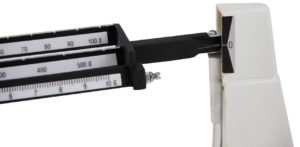
 

The maximum weight a triple beam balance can measure is 600 grams.

  • The first beam can measure up to 10 grams.
  • The second beam can measure up to 500 grams, read in 100 g increments.
  • The third beam can measure up to 100 grams, read in 10 g increments.

Each beam has notches (e.g., grooves) for the weights. You must use them; otherwise you will not be able to record accurate measurements.

To get you started on easy and efficient use of your triple beam balance, here’s a few suggestions.

For Best Results with a Triple Beam Balance:

Before you weigh something, ‘zero‘ the balance. Do this by sliding back all the weight poises (that slide along the beams) so that the pointer is right at the zero line. You might need to turn the zero adjustment knob a little bit to get it right at the line.

When you set an object on the balance platform, the pointer immediately goes up and is no longer zeroed. To find out the weight of the object, you’ll need to slide the weight poises until the pointer is at zero again. Start with the two heavier weight poises and then use the lightest one to do the fine tuning.

The HST triple beam balance and the Ohaus model are accurate to 0.1 grams.

To read the weight of an object in grams, add up the number that each weight poise is at when the pointer zeroes.

For example, if the heaviest poise is at 100 g, the next one at 30 g, and the lightest one at 5.4 g, then the total weight of the object is 135.4 grams.

Product Guides

Welcome! After you finish this article, read other articles to assist you in with choosing and using HST products. Or browse the rest of the Homeschool Hub, which consists of over 650 free science articles!

Shop for Science Supplies!

Home Science Tools offers a wide variety of science products and kits. Find  everything you need to teach science for all ages!

Related Articles

The Window to the Micro-World: A Guide to Microscope Slides

The Window to the Micro-World: A Guide to Microscope Slides

Many people wonder what makes the invisible world appear so remarkably clear under a lens. While the microscope itself often receives the most attention, unsung heroes in the laboratory make scientific discovery possible: microscope slides. Whether the user is a...

Bringing Astronomy into the Home Classroom with Telescopes for Kids

Bringing Astronomy into the Home Classroom with Telescopes for Kids

Standing in the backyard on a clear night, watching a child point out a bright "star" that turns out to be Jupiter, is a powerful moment. As parents and educators, we constantly seek ways to nurture that innate sense of wonder. Finding the right telescope for kids is...

7 Excellent Reasons to Invest in STEM Toys for Your Kids

7 Excellent Reasons to Invest in STEM Toys for Your Kids

Raising capable, curious kids in a tech-driven world can be challenging. There are screens everywhere, and their attention spans feel shorter. Parents are constantly asking the same question: how do I help my child learn skills that actually matter for the future? One...

Advice for Homeschooling and Science: A Practical Guide for Parents

Advice for Homeschooling and Science: A Practical Guide for Parents

Teaching science at home can feel intimidating at first, not because science is inaccessible, but because many adults were taught it in ways that felt rigid, abstract, or disconnected from real life. Homeschooling gives you a rare advantage: the freedom to teach...

should I learn computer coding